Working with alerts (Alerts)
The original draft described a dedicated Alerts page listing stream-quality/camera-health alerts, delivered via SSE, with the ability to mark individual or bulk items as seen. When checked against the live Portal (2026-07-21): no dedicated Alerts page was found anywhere in the navigation, and the guessed URLs /alerts, /alert, and /notifications all returned 404 — meaning there's no independent route for this feature. All "notifications" observed live inside the notification dropdown at the bell icon in the top bar, with real content quite different from the original assumption (see below). The SSE mechanism, marking as seen, and filtering by camera/task/location — as described in the original draft — have not been confirmed to exist; the content below only describes what was directly observed.
The Camera AI Portal shows system notifications via the bell icon in the top bar (next to the language selector).
Viewing notifications
- Click the bell icon (shows a notification count badge, e.g. "99+").
- The Notifications list appears as a dropdown, each item showing: the location name + related camera code, the notification content, and a relative time (e.g. "a day ago", "2 days ago").
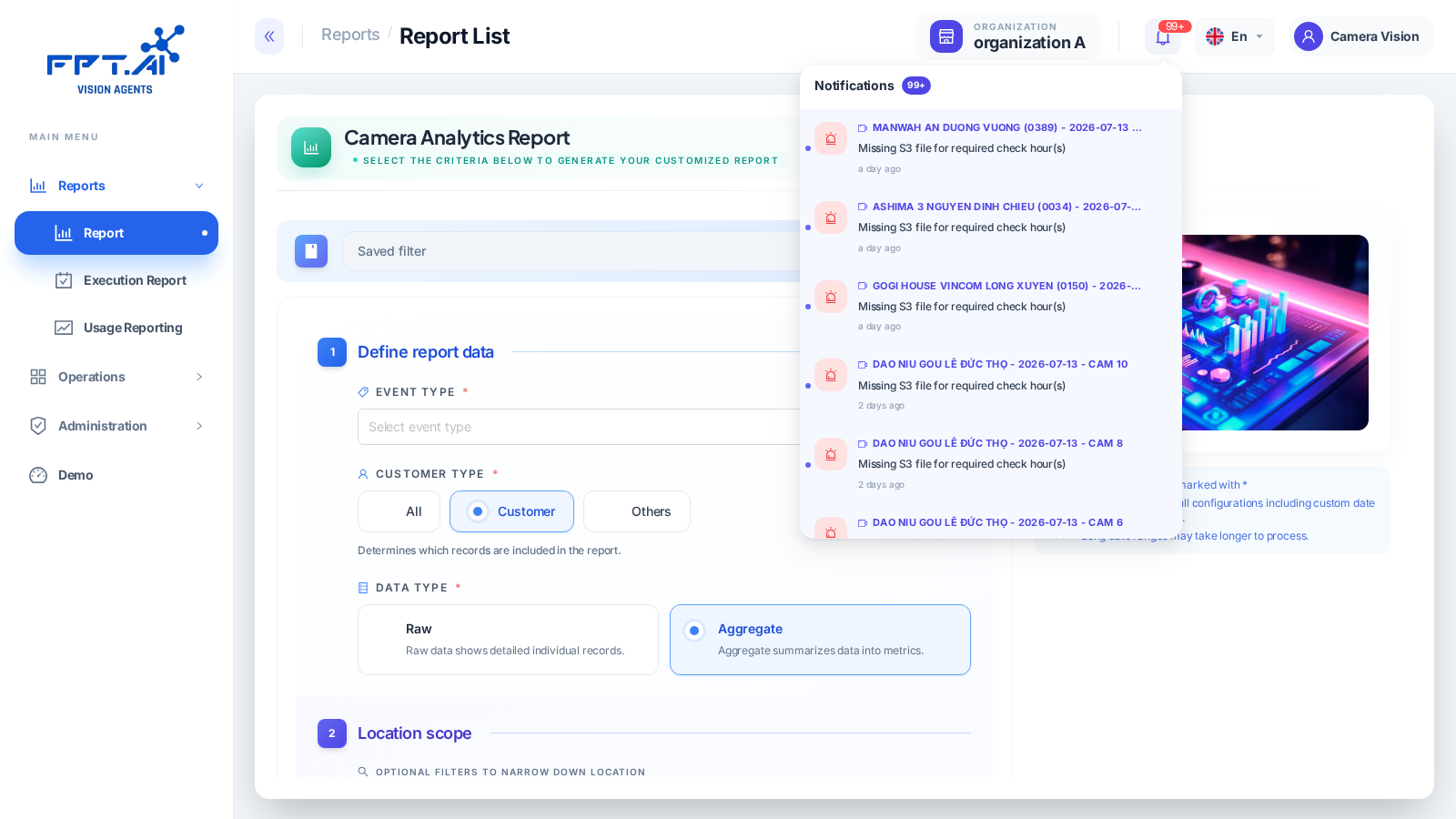
Example of a real notification observed:
MANWAH AN DUONG VUONG (0389) - 2026-07-13 - CAM 3 — Missing S3 file for required check hour(s)
This is a notification about a missing-upload condition (a stored video file is missing for the required check hour) — different from the stream-quality (freeze/signal loss) or camera-health alert groups described in the original draft.
Camera health status (Active/Inactive/Error) is shown directly in the Camera Health column on the Operations → List Camera page — it does not appear in the bell notification dropdown. See Managing cameras and Camera diagnostics.
Not confirmed during this round of testing
- Whether a mechanism exists to mark individual or bulk notifications as "seen"/"unseen".
- Whether a filter exists for notifications by camera/task/location.
- The real-time delivery mechanism (SSE or periodic polling).
- The full list of notification types beyond the "Missing S3 file" type observed.
These items need a follow-up walkthrough focused specifically on the notification feature before this doc can be considered complete.
Next steps
- Managing cameras — camera health status.
- Camera diagnostics — troubleshooting cameras.